Help Center
Use SeaTalk
Change Log
Find our newest releases here, and keep up-to-date with our newest features.
FAQ: How to find the version of SeaTalk you are currently on?
v3.70.1 - September 2026
Adjustable Panels for Thread, Combined Forwarded Chat History, and Scheduled Message
You can now adjust each panel to match your viewing preference and enjoy a smoother messaging experience.
v3.67 - June 2026
Archive Chat
You can now archive chats to hide them from your main chat list and focus on chats that matter most.
Internal and External Groups
Introducing Internal and External Groups, making it easier to identify external collaborators while keeping internal conversations secure.
Bots Can Now Send Table Messages and Streaming Messages
-
Table messages make it easy to display structured data clearly in chats. Learn more about the supported formats here.
-
Streaming messages allow AI-generated responses to appear progressively as they are generated. Find out how to activate the feature here.
v3.62 - January 2026
Various Enhancements:
- Bug fixes and performance enhancements
- User interface optimization
v3.61 - December 2025
Live Photo Support:
-
iOS users can now send Live Photos
-
All platforms (Mobile/Desktop/Web) can receive and view Live Photos seamlessly
Emoji Reaction Enhancements
-
Quick reaction shortcuts for faster, more intuitive emoji responses
v3.60 - November 2025
Extract Text from Images
You can now enjoy text extraction from images, allowing you to further boost productivity by selecting text from images without retyping. Find out how to activate the feature here.
v3.59 - October 2025
Various Enhancements:
- GIFs are now supported in the media viewer!
- Squashed numerous bugs.
v3.58 - September 2025
Auto Translate Messages
Easily translate chat messages automatically within a chatroom. This feature is only available to certain organizations.
Keyboard Navigation and More Shortcuts
You can now use your keyboard to navigate across the desktop version of SeaTalk. There's lots of nifty little tricks that you can now do, such as using your keyboard arrow keys to navigate onto a message and quickly carrying out chat actions such as quoting a message, all without using your mouse!
- Check out the detailed article for a further breakdown of what you can achieve with this new roll-out.
v3.57 - August 2025
Introducing the Forward to Thread function
Forward messages into a thread directly to continue the conversation more seamlessly.
v3.56 - July 2025
Introducing Chat Intelligence - Desktop Exclusive
Easily polish, translate your draft messages, or get a summary of your chat history - all with the new Chat Intelligence feature, now available exclusively on the Desktop app.
Indented Lists on Desktop
You can now create indented lists on desktop by pressing tab to indent and shift+tab to unindent. Currently, SeaTalk only supports indenting from the second list item onwards.
v3.55 - June 2025
Various Enhancements:
- Revamped the UIUX for expiring groups.
- Updated certain translations throughout the app for clarity.
- Numerous bugs squashed and various other technical improvements.
v3.54 - May 2025
Introducing the 'Keep Chat History' function
Set a personalised retention period for each chat to control how long the chat history will remain on your devices.
v3.53 - March 2025
Various Enhancements:
- Disappearing Messages now have an indicator in the input box when turned on.
- Scheduled messages on the desktop app now have a hover to view various message actions.
- Bug fixes and other technical improvements.
v3.52 - February 2025
Introducing the Schedule Message function
Schedule text messages to be sent later, making it easy to work across time zones or ensure a colleague receives your message after returning from leave.
v3.51 - January 2025
Various Enhancements:
- Threads with drafts are now added into the threads list for easier visiblity.
- Bug fixes and other technical improvements.
v3.50 - December 2024
Enhanced In-Chat Link Search
All links that are sent from SeaTalk's v3.50 onwards will now be shown in the in-chat search under the 'Link' tab. You can view links that are sent from other users, and easily search for links that you desire. (Links sent by bots and system accounts are excluded.)
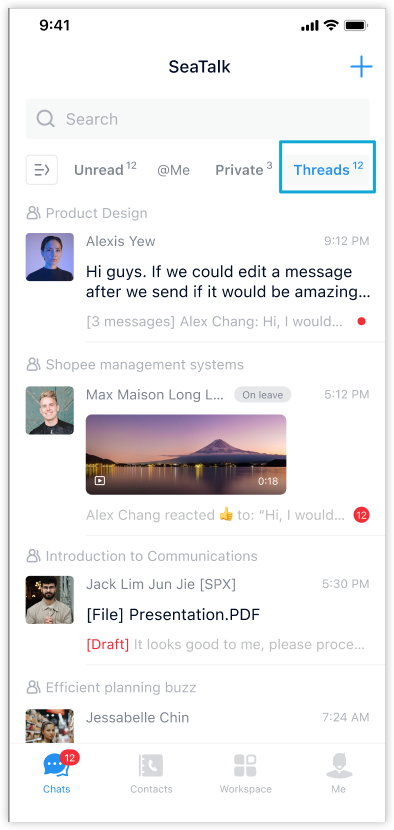
Introducing the 'Threads' Chat Label
Conveniently access all your followed threads across chats in one place.
New supported message types for bots
SeaTalk Open Platform Bots can now receive images, files and videos in events and API responses. For more information, please click here for our documentation.
Was this helpful?
